
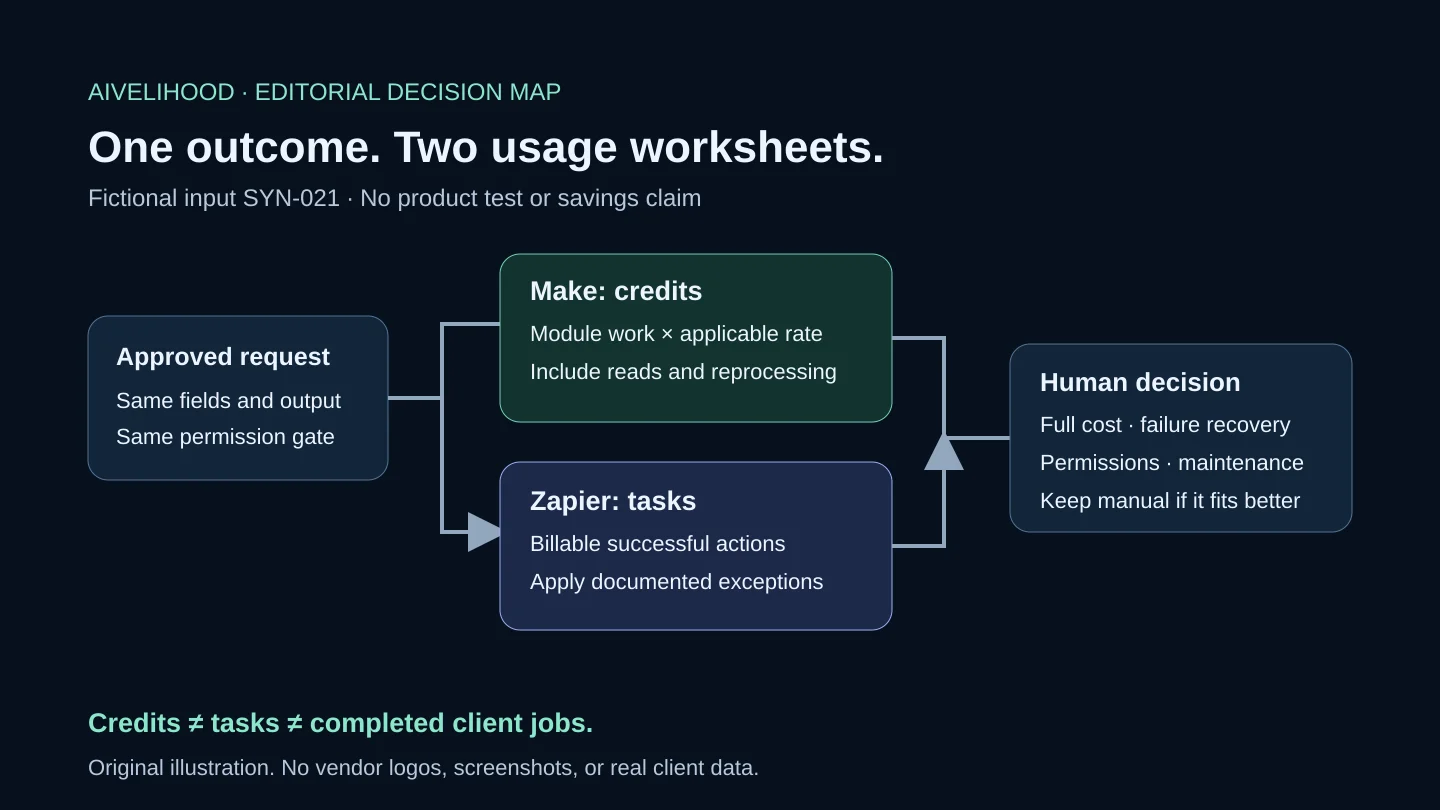
A larger free allowance is a poor reason to move a client's workflow. Make and Zapier count usage differently, and a design that fits one platform may need different steps on the other. Start with the job you need done, then compare its cost and the work of keeping it running.
For a freelancer choosing between them, the deciding question may be less glamorous than a feature list: can the next person spot a half-finished request and recover without duplicating it? We use one fictional intake workflow to compare that responsibility, along with permissions, plan limits, and handoff. This is a documentation-based comparison for small freelance operations, not a live test or a recommendation to automate client judgment.
The short answer: eliminate a poor fit first
First check the exact integration, not the app logo. If a platform cannot detect the required event or write the fields you need on the chosen plan, set it aside. Next ask who will operate it. A client who already maintains a suitable Zapier workflow needs a concrete reason to move; a Make design still needs someone who can inspect module behavior, credit usage, and exceptions. These are editorial selection rules, not a claim that either interface is inherently easier.
Only then compare the operating budget. A platform that supports the steps and fits the future operator is worth costing; one that fails either check is not rescued by a generous allowance. If the task changes frequently, runs rarely, or has unresolved permissions, keep the manual spreadsheet. Use the automation decision framework if you have not settled on a repeatable task.
| Decision | Make evaluation | Zapier evaluation |
|---|---|---|
| Required integration | Confirm the actual module, fields, and connection | Confirm the actual trigger, action, and fields |
| Usage budget | Estimate module operations and applicable credit rates | Estimate billable actions under the relevant task rules |
| Failure recovery | Check incomplete executions and configured error handling | Check the relevant replay mode and plan availability |
| Handoff | Name the connection, billing, and exception owner | Name the connection, billing, and exception owner |
Give both platforms the same job
Use this illustrative brief for both: a person approves fictional request SYN-021 in a test intake sheet. The workflow reads only permitted fields, looks for that ID in a review queue, creates a queue record when appropriate, and marks the source as staged. Email, client acceptance, invoices, and publishing are outside the job.
The expected row contains request_id, service_type, source_reference, and review_status. Acceptance means one matching queue entry and a visible outcome on the source. A different trigger pattern is acceptable if it meets that same brief. Removing the duplicate check to fit a plan would change the job, not make one platform a better deal.
Check approval timing explicitly: detecting a new row is different from detecting a later approval edit. Confirm the actual event and accessible fields in each integration; a supported app name is not enough.
- Required behavior: process only an explicitly approved request.
- Required control: recognize an existing request ID before another write.
- Required exception: stop when approval or a necessary field is missing.
- Required recovery: identify a queue write that succeeded before a source update failed.
Use two worksheets: credits are not tasks
Make's documentation uses credits as the billing unit. Standard non-AI operations generally use one credit per operation; other features can use different rates. Multiple records and repeated module work can change the total. Zapier's detailed accounting lists successful actions as tasks, with exceptions: triggers and polling checks do not consume tasks, and Filter, Paths, and several built-in steps do not count. AI and other specialized steps can have different rates.
Do not turn those rules into a blanket price comparison. For the same business result, the platforms may require different modules, searches, branches, and record handling. A Make credit is not a Zapier task, and neither is a completed client job.
| Line item | Make credit worksheet | Zapier task worksheet |
|---|---|---|
| Read approved input | Record actual reads or polling module operations | Record trigger type; trigger polling itself uses no tasks |
| Look up request ID | Record search operations and returned bundles | Record search configuration; apply its documented task rule |
| Create queue record | Count successful record operations at the applicable rate | Count each successful billable action |
| Update source status | Count updates actually performed | Count each successful billable action |
| No-match and duplicate cases | Record work still performed before stopping | Record only steps that execute under the applicable rules |
| Retries and replay | Add reprocessed operations separately | Add repeated successful billable actions where applicable |
Work through 20 fictional approved requests, two duplicates, and one interrupted request on paper. These are planning inputs, not results from either product. If the chosen Zap performs exactly two ordinary billable writes for each approved request, those writes total 40 tasks. A billable search or recovery step goes on another line. The Make column needs its own module-execution counts and rates; copying the number 40 across would erase the difference you are trying to compare.
Keep subscription cost, usage, connected-app fees, setup, review, and maintenance on separate lines. Select the actual plan and billing interval before comparing monthly totals in one currency. There is no current paid-price or savings claim here.
Test whether the free plan supports the design
Free-plan eligibility can settle the decision before price does. Zapier's pricing page checked October 18, 2026 lists 100 monthly tasks and two-step Zaps on Free; Professional lists multi-step Zaps and premium apps. Our intake example has more than one action. Its full design is not a two-step Free workflow, even if the editor lets you explore it during a trial.
For Make, check the proposed schedule, active scenarios, selected modules, and credits against the current account limits. Enough credits do not prove that every feature is included. Use the Make beginner guide for the initial evaluation, then confirm the plan again before buying.
If the required plan costs more than the recurring work justifies, keep the manual version. A premium feature appearing in a tutorial is not a business reason to pay for it.
Compare the broken run before the polished demo
Now interrupt the fictional job after the queue write but before the source update. The source still looks unfinished, although SYN-021 is already in the destination. The operator must inspect both places before retrying. A success indicator is not the acceptance test, and a separate search followed by a write cannot guarantee exactly-once processing when runs overlap.
The tools offer different recovery controls. Make documents configured error handlers and incomplete executions; those controls do not turn every connected action into a transaction. Zapier separates replaying failed steps from replaying a whole run. A full replay can repeat successful actions and use tasks again. Check the particular replay mode and plan before relying on it. Neither product description makes this example safe to replay without inspection.
For a useful handoff test, ask the future operator what they would do with a revoked connection, renamed column, repeated ID, or partial write. They need a pause procedure, a manual route, and a person to contact. If that explanation is missing, simplify the process before adding more automation.
Include client ownership and permissions in the decision
Compare the permissions actually requested in a dedicated test account. Selecting a single sheet in a workflow does not prove that the connection grants access only to that sheet. Do not authorize an account scope you cannot explain to the client.
Before live work, agree which provider receives which fields, who owns the accounts and subscription, who can see run history, and how access is revoked. Permission to edit a deliverable is not automatic permission to upload its source material elsewhere. Keep sensitive data and credentials out of screenshots, sample exports, and shared briefs.
If you are purchasing implementation rather than learning, use the automation hiring checklist to scope a pilot and maintenance. Hiring changes who does the work; it does not remove your responsibility to approve the data flow.
Make the decision explainable to the client
- The exact trigger and actions are supported in the chosen account and plan.
- The usage worksheet includes quiet periods, duplicates, and recovery—not just successful requests.
- The person operating the workflow can identify a partial result and pause it.
- The client approves access, ownership, data handling, and maintenance responsibilities.
- The chosen platform beats the manual baseline for this task, or the decision is to stay manual.
Write down the deciding reason. For example: the required steps fit the selected plan, the expected usage is affordable, and the named operator can recover a partial result. Those are reasons a client can question or verify. A larger allowance on a pricing card is not.
If that reasoning favors Make, try the written workflow before committing to a subscription:
Evaluate Make for your written workflow
This is an affiliate placement; AIvelihood may earn a commission from a qualifying purchase. It does not change the comparison criteria. See our Affiliate Disclosure.
If Zapier meets the requirements better, use its ordinary official plan information. If neither justifies the extra cost and upkeep, keep the checklist. Staying manual is a valid decision, not an unfinished comparison.
Evidence boundary: official-source desk research checked October 18, 2026. We have not operated these platforms for this comparison or verified this design end to end. The worksheet, synthetic inputs, and selection rules are editorial analysis, not measured reliability, time savings, or income evidence.
Frequently asked questions
What should I check before paying for either platform?
Name the exact trigger and actions, verify their current plan eligibility, and record connection scope, usage assumptions, recovery steps, and who maintains the workflow. Do not upgrade merely to complete a tutorial. If those requirements or the recurring workload are unclear, keep the manual process while you resolve them.
Is Make always cheaper than Zapier?
No conclusion follows from comparing credits with tasks. Compare the same outcome, actual step behavior, plan eligibility, connected-service costs, and maintenance. This article does not present a measured cost benchmark.
Can I run the full sample on Zapier Free?
Do not assume so. The documented Free plan supports a trigger and one action, while the illustrative intake design contains multiple actions. Check the current plan and integration requirements before attempting a live workflow.
Should I move a working client workflow to Make?
Not without a concrete reason. Include migration, parallel checks, ownership, recovery, and maintenance in the decision. A referral link or a larger advertised allowance is not sufficient justification.
Do these workflows need AI?
No. Approval, identifier checks, and field copying can be rules-based. Add AI only for a defined task whose uncertain output can be reviewed; it adds another cost and data-handling decision.